Tool |
|
Tool |
|
The Use Coordinate command performs a selection based on a user-specified set of coordinates. The application will select a single item found at the specified coordinates, be it a point in a point cloud or a feature object in an ENC. This is useful for selecting features. Coordinates can be entered in Geographic format or Ground format.
This command uses the same dialog box as the Centre on Coordinate and Position Cursor commands. Once coordinates are entered for one of these commands, they are saved to the Lat and Lon fields in the toolbar and can be used for any of the three commands. The fields in the toolbar must be used if the coordinates need to be changed for subsequent tasks. Completely removing the coordinates from these fields allows the dialog box to again be launched from the commands.
Related commands:
Procedure
1. Click the Use Coordinate button.
The Coordinate Entry dialog box is displayed.
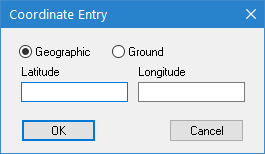
2. Select the coordinate format you wish to use.
3. Type the coordinates in the fields.
4. Click OK.
A selection is performed on the data found at the specified coordinates.
