Menu | Tools > Engineering Analysis > Shoals > Change Status |
Tool |
|
The Change Status command is used to change the status of registered shoal boxes. Shoals are either Active or Cancelled.
• Active shoals are currently relevant and need to be considered during navigation.
• Cancelled shoals are historical and not a current hazard.
To change the status of a shoal, it must be registered in the database. See Register in Database for more information. |
To change the status of shoals:
1. Select the Shoal Boxes layer in the Layers window.
2. Select the shoal boxes in the Display window for which you want to change the status.
3. Select the Change Status command.
Menu | Tools > Engineering Analysis > Shoals > Change Status |
Tool |
|
The Change Status dialog box is displayed.
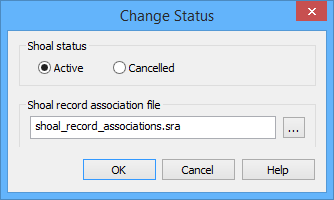
4. Select a Shoal status option.
The status of a shoal box is identified by a number, which can be viewed in the Attributes window under the Status attribute (shlsta). This number is defined in your shoal record associations file (for example, Active = 1, Cancelled = 2).
5. Click Browse (...) to select a Shoal record association file.
6. Click OK.
If the selected shoals have not been registered in a database, an error message will be displayed in the Output window. |
The status of the selected shoal box(es) is updated.
