Export open reference model data to a DXF file.
1. Open a reference model if one is not already open.
2. Select the (Export) Model to DXF File command.
Menu | File > Export > Model to DXF File |
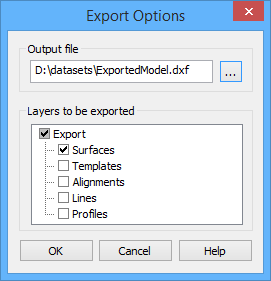
The Export Options dialog box is displayed.
3. Click the Output file browse button (...) to select a location for the file.
A Save As dialog box is displayed.
4. Select a location and file name.
5. Click Save.
The Save As dialog box is closed; the Export Options dialog box is redisplayed.
3D surfaces and 3D lines are exported as 3D lines; other features are exported as 2D lines. |
In the Layers to be exported field, selecting the Export layer option automatically selects or deselects all layer types. If clicked when the dialog box is first opened, it will deselect all layer types. Clicking it again will select all layer types. When only certain layer types are selected, the check box for the Export option is shaded in grey.
6. Click the check boxes to select the layer types to include in the export.
7. Click OK to complete the export.
The progress of the export can be seen in the Status bar. When finished, a message is displayed in the Output window stating the start and stop times of the export. The exported reference model can be opened as an AutoCAD map.