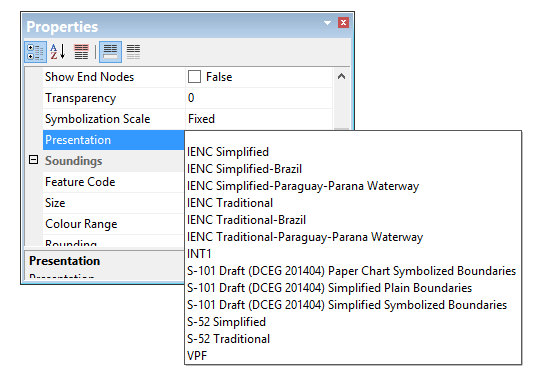
Portrayals are catalogues of lookup tables, colour tables, symbols and other files that make up drawing instructions for chart presentations. Portrayals can be based on
• IHO or other standards for chart display
• custom organizational requirements
Portrayals are accessed in CARIS modules through the Options dialog box or Properties window.
When a portrayal is selected, the display is refreshed to show features in that portrayal.
Standard IHO portrayals are included in the CARIS installation. These can be grouped into three categories, see below.
Category | Portrayal |
S-52 | S-52 Lite |
S-52 Simplified | |
S-52 Traditional | |
IENC Simplified | |
IENC Simplified-Brazil | |
IENC Simplified-Paraguay-Parana Waterway | |
IENC Traditional | |
IENC Traditional-Brazil | |
IENC Traditional-Paraguay-Parana Waterway | |
Vector Product Format | |
Paper charts | INT1 |
S-100 | S-101 Draft (DCEG 201404) Simplified Plain Boundaries |
S-101 Draft (DCEG 201404) Simplified Symbolized Boundaries | |
S-101 Draft (DCEG 201404) Paper Chart Symbolized Boundaries |
Portrayals in CARIS are managed through the Portrayal Control File. This file links lookup tables, colour files and symbol information to a portrayal.
Custom portrayals can be created and added to the Portrayal Control File – however, files that comprise the portrayal should be created from copies of the default files. Default files should not be modified.