NetCDF (network Common Data Form) is a general-purpose file format that supports the creation, access, and sharing of four-dimensional data. BASE Editor supports netCDF data standardized on the COARDS profile.
Although netCDF is a supported surface format, it is not compatible with the following commands:
• File > Export > Surface to HTF
• Database > Add Surface
• Tools > Surfaces > Combine
• Tools > Surfaces > Extract
• Tools > Surfaces > Copy/Join
• Tools > Surfaces > Vertical Shift
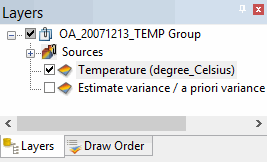
When a netCDF file is opened in BASE Editor, the data is displayed as a Point Cloud with attribute layers.
Because this is 4D data, you must define the slice of data you want to see. Slices are defined by a particular height (depth) and time. The default slice displayed is the first slice in the list.
To change the slice displayed:
1. Select an attribute layer in the Layers window.
The Properties window is populated with the Data slices properties. These properties allow you to define the height and time for which you want to see data. When you select values, the slice that matches the selected values will be displayed.