Menu | Edit > Add Navigation Sources |
Tool |
|
The navigation section of the HVF describes the location of the navigation source (for example, antenna or motion sensor). This section is used as a link between the fixed positioning coordinate system and the instantaneous vessel coordinate system.
Navigation can loaded from multiple sources for each line, and each of these sources can have their own configuration in Vessel Editor. If a configuration is not specified for a specific source type, the default Navigation sensor configuration is used.
To configure navigation sources:
1. Click Navigation in the Sensors list box to highlight the selection and enable the navigation data fields.
2. Select the Add Navigation Sources command.
Menu | Edit > Add Navigation Sources |
Tool |
|
The Add Navigation Sources dialog box is displayed.
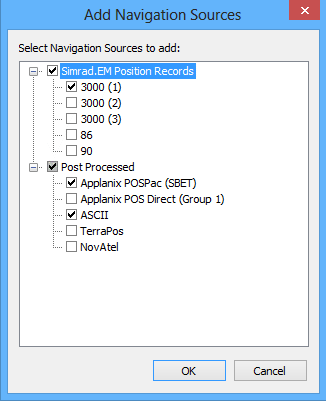
3. Select the sources for the project from the list of available formats.
4. Click OK.
Each of the selected sources will be listed in the sensors table.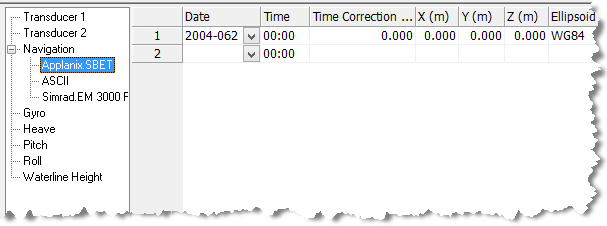
5. Type data as needed in the following fields:
• Date: The year and Julian day of the current navigation time stamp.
• Time: The hour and minute of the current navigation time stamp.
• Time Correction: The time correction value.
The X-Y-Z fields set the location of the navigation source from the Reference Point (0).
• X: The athwart-ship distance of the source, positive to starboard.
• Y: The along-ship distance of the source, positive towards the bow.
• Z: The vertical distance of the source, positive into the water.
• Ellipsoid: From the drop-down list, select the ellipsoid on which the navigation is based. The ellipsoid should be the same as the one used in the survey.
If you will be applying GPS tide data it must use the ellipsoid selected here. |
• Manufacturer: The maker of the navigation equipment.
• Model: The particular make of navigation equipment.
• Serial Number: The serial number of the navigation equipment.
