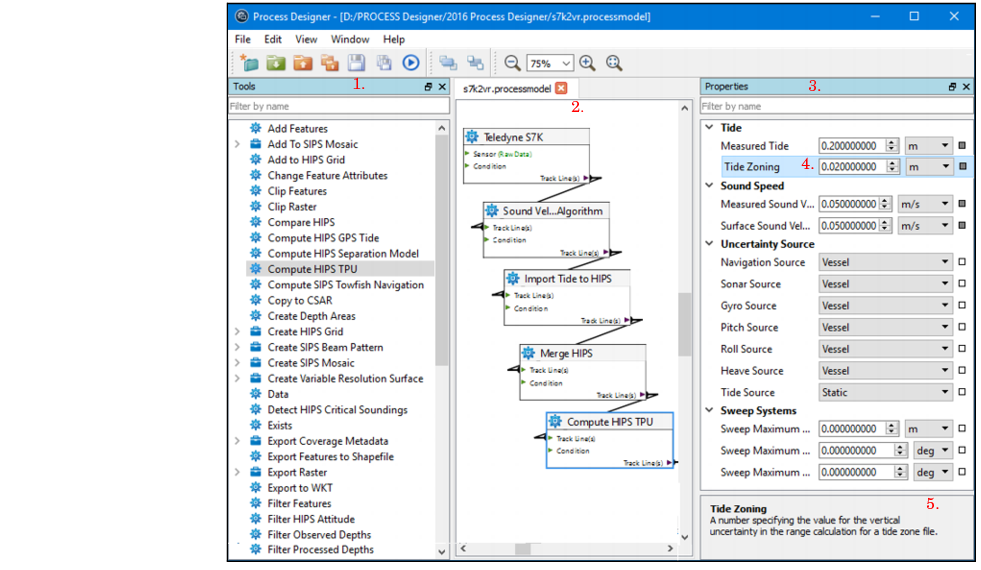
Process Designer is used to graphically build a workflow and save it to a process model file which can be applied to survey data for batch processing.
A process model file is a sequence of processes and their associated configurations, connected in a logical sequence and saved with the file extension *.processmodel.
In Process Designer, tools are listed in the Tools list (1.). These tools can be added to the display window (model view) (2.), where they are ordered, connected and have properties set from the Properties window (3.).
When a properties field is selected (4.), a description of the function of the field is displayed (5.) in the description panel at the bottom of the Properties window.
Items in the Tools List are in alphabetical order. To quickly find an item in the list:
1. Type the name of the item in the Filter by name field and the matching item(s) will be displayed.
Both the Tool List and the Properties window can be docked (repositioned) within the Process Designer interface or onto your desktop.
To reposition one of these windows within the interface:
1. Select the window by its title bar, and drag it to the new position.
Certain areas in the interface will turn blue as you move the window over them. This indicates that the window can be docked there.
2. Release the mouse button to place the window in the new location.