All sonar data is stored using 16 bits.
Interface
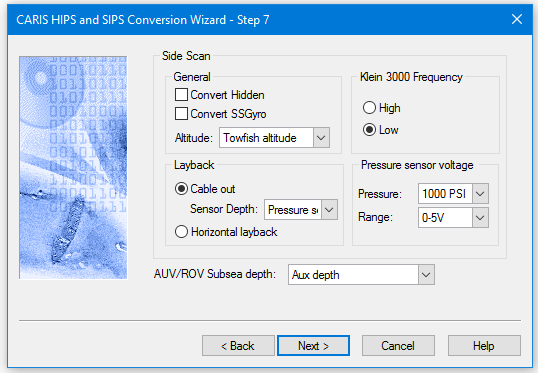
Options for converting Klein data to HIPS are displayed in this dialog box.
Option | Description |
General | |
Convert Hidden | Select the Convert Hidden check box to convert redundant data collected during acquisition. |
Convert SSGyro | Select the Convert SSGyro check box to include side scan sonar gyro data. |
Altitude | Select Towfish altitude from the list Select Aux altitude to convert sonar altitude from the auxiliary altitude field in the sonar record. |
Klein 3000 Frequency | Set to High or Low. |
Layback | Select either Cable Out or Horizontal layback. Default setting is Cable out. |
Cable out | Set to apply Cable out. |
Sensor Depth | If Cable out is active, select Aux depth or Pressure sensor voltage from the list. |
Horizontal layback | If horizontal layback is selected, sensor depth is set to 0.0 metres. |
Pressure sensor voltage | If used by the Sensor depth or AUV/ROV Subsea depth option, the settings used during acquisition will need to be set to properly convert the voltage to a depth value. |
Pressure | Select a Pressure Sensor reading from the drop-down list to set the depth of the towfish. |
Range | Select the Range of voltage for the pressure sensor, either 0-5V or 1-5V. |
AUV/ROV Subsea depth | Default setting is Aux depth to use the data in the auxiliary depth field. If for any reason, the Aux depth setting is invalid, select the Pressure sensor voltage option (and set correct Pressure and Range values) to override the Aux depth setting. |
Procedure
1. Set options.
2. Click Next to continue with conversion process.