Hypack format, as stored in .raw and .hsx files, can store single beam, multibeam, multi-transducer and side scan data.
Interface
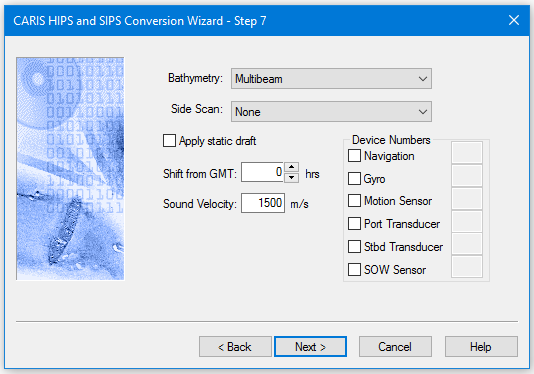
Options for converting Hypack *raw and *.hsx data to HIPS are displayed in this dialog box:
Option | Description
|
Bathymetery | Select the type of bathymetry to be converted. |
Side Scan | Select the type of side scan data to be converted. |
Apply static draft | |
Shift from GMT | Some HSX data may contain local time. To shift the time stamps of this data to GMT use the Shift from GMT option to synchronize Hypack data with externally logged files, such as backscatter in 7K or Water Column imagery 1. Type the number of hours by which to shift to time stamps so that they show as GMT. |
Sound Velocity | 1. Enter a value to compute the original travel time data from the recorded depths. |
Device Numbers | If sensor data was recorded by more than one device, select the device and enter an identifying number. If no number is enterd, all sensor data is imported. |