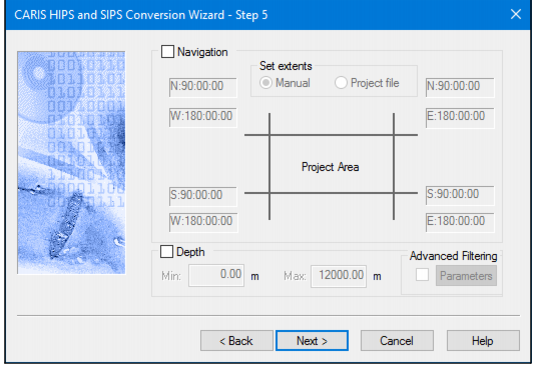
During the conversion process, some soundings can be automatically rejected due to disabled beams. This is controlled by the beam status settings in the vessel configuration.
Also, several multibeam formats pre-flag some soundings as being failed detects. These soundings are also automatically rejected during conversion.
This dialog box defines basic navigation and depth filters to automatically reject extremely large errors in the recorded navigation and depth data. By default the extents are taken from the data.
The extents of the filter can be defined either by setting them manually in this dialog box, or by using the extents as defined in the project selected at Step 3 or 4.
Procedure
1. Click Next to continue the conversion and use default settings for data extents.
2. [Optional] Select the Navigation check box to enable the navigation filter.
3. Select either Manual option or the Project File option.
If you selected the Manual option, enter the extent coordinates in the fields. Use the <Tab> key to move between fields and use the arrow keys to move between values in a field.
Project file option will use the existing project extents.
4. Select the Depth check box to enable the depth filter.
Enter the minimum acceptable depth.
Enter a maximum acceptable depth.
Advanced filtering is available for certain multibeam or multi-transducer data. If filtering is not available for the type of data you are converting, this option is be greyed-out.
The HIPS converter for reading Klein SDF data files has been enhanced to read the bathymetry data from the Klein data format 5000 V2. As a result of this enhancement, the filtering capabilities in step 5 of the Conversion Wizard are now enabled for this conversion. These settings are functional only for the format 5000 V2 data, as no other formats processed by the SDF converter currently contain bathymetry. |
To use advanced filtering:
5. Enable the Depth check box.
6. Select the Advanced Filtering check box and click Parameters to open the advanced filtering options.
7. Click Next.