
A feature object ID is a unique identifier assigned to features as they are created. If you create a feature on a new feature layer, the feature object ID will be assigned when you save the layer or when you import the feature to another layer.
The feature object IDs used by a particular installation of CARIS are designed based on the settings specified in the wizard.
A feature object ID is composed of:
• Agency: a two-character code based on the International Hydrographic Organization (IHO) agency producer scheme. You set the agency on the Edit category of the First-Time Run wizard or by modifying the Producing Agency option in the Options command.
• Identifier: a number from 1 to 232 (4,294,967,294) that is incremented by 1 each time a new feature is added to the data set. You set the starting value in the First-Time Run wizard.
• Subdivision: a number from 1 to 216 (65,536) used to group the IDs. This can be a single number or a range. You set the value or values in the First-Time Run wizard or by modifying the Unique Object ID option in the Options command.
For example, 1C 0000039802 00003 means:
• agency code 1C
• object 39802
• in subdivision 3
If you select <New> from the Unique Object ID options, the Create Unique Object ID File dialog box is displayed.
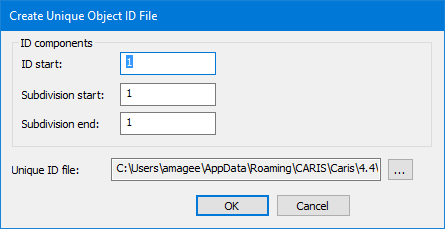
Option | Description |
ID components | These options define the identifier and the subdivision: • ID start: The start value of the identifier. This will be incremented as features are added. • Subdivision start: The start value for the subdivision. Must be less than Subdivision end. • Subdivision end: The end value for the subdivision. Must be greater than Subdivision start. If the start and end values are the same, a single subdivision value is used. |
Unique ID file | The location and file name of a file that stores the ID values. This file is updated as features are added to contain the next identifier and, if appropriate, subdivision value. |
A subdivision number or range is used to ensure that features are assigned unique IDs when they are created by different groups within the same organization. Each group is assigned a subdivision value.
A subdivision value does not change as features are added unless the identifier value exceeds its limit of 232.
If this happens, the identifier will be reset and the subdivision value will be incremented by one.
If the last subdivision value in the range is reached, you must change the settings before more features can be created.
For example, given a starting identifier of 1 and a subdivision range of 1 to 3, the following sequence of feature object IDs could be generated:
1C 0000000001 00001 1C 0000000002 00001 1C 0000000003 00001 . . . 1C 4294967293 00001 1C 4294967294 00001 1C 0000000001 00002 1C 0000000002 00002 . . . 1C 4294967293 00002 1C 4294967294 00002 1C 0000000001 00003 1C 0000000002 00003 |