In info files the delimiter can be a TAB character or any letter, number or symbol. In the XYZ example below, the values are separated by commas, so, in the info file the Delimiter would be expressed as “,”. 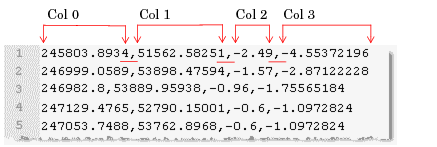
In info files the delimiter can be a TAB character or any letter, number or symbol. In the XYZ example below, the values are separated by commas, so, in the info file the Delimiter would be expressed as “,”.
Since this comma-delimited file does not have a heading, in the info file the number of Skip Lines is set to “0”.
The Position information section first defines a multiplier for each coordinate. If no adjustments need to be made to the coordinate information then this value is set to “1”.
Then the location of the values of the X, Y and Z coordinates are given.
• If the ASCII file is free form format, with fields of varying lengths separated by delimiters, a Col_Index value and a delimiter value must be specified.
• If the file is in fixed column format, the Start position and the width of the value field are defined.
Column Index
The column index value, Col_Index, assigns a column number to each field or attribute in the file. This number corresponds to the columns in the ASCII file. The columns are numbered from left to right, starting with 0. So X (Longitude) would be column 0, Y (Latitude) would be column 1 and Z (Primary Elevation) would be column 2.
In the example above, commas are the delimiters, and four columns ( 0-3) are identified (as highlighted in the example).
Start and Width
Alternatively, you can identify the data boundaries for each attribute column by using the Start_Pos and Width fields. These fields are also used for XYZ files in fixed column format.
Using the start and width values, each character in a line is numbered and the number of characters in each attribute value is used to identify a column. The characters in the line are numbered from left to right, starting with 0 and continued until the end of the line. For example a line with 6 attribute columns might have 70 characters.
In the example above, the first attribute column would have a start value of 0 with a width value of 11 because there are 11 characters in the X (Longitude) value. The second column (Y or Latitude) would start with the next consecutive number, making the start value 12. It has a width value of 11, taking up characters 12 to 23 in the array of numbers. The start value of the third column (elevation) would then be 24 and the width value would be 5.
• x values: Start_Pos = 0; Width = 11
• y values: Start_Pos = 12; Width = 11
• z values: Start_Pos = 24; Width = 5
The start position and width values can also be used to omit character columns of information from the attribute.
For example, to omit coordinate quadrant information where:
• the quadrant is the last character:
x values: Start_Pos = 0; Width = 11; y values: Start_Pos = 12; Width = 12
• the quadrant is the first character:
x values: Start_Pos = 1; Width = 11; y values: Start_Pos = 12; Width = 12
If data is in a delimited file where the coordinates have a fixed precision, including quadrant information, this can be extracted using the Start_Pos and Width relative to the delimiter character. For example, the following data,
could be read with an INFO file set with a delimiter of a single space character (' ') and the following values for the coordinates:
• x values: Col_Index = 1, Start_Pos = 0; Width = 9;
• y values: Col_Index = 0, Start_Pos = 0; Width = 9;
• z values: Col_Index = 2, Start_Pos = 0; Width = 0;
The width value does not include the quadrant letter, so only the non-letter characters of the coordinates will be read. |