Menu | Process > Beam Pattern > Sediment Class |
Tool |
|
Menu | Process > Beam Pattern > Sediment Class |
Tool |
|
When a beam pattern is created using the GeoCoder engine, it removes the sediment response component, based on the internal sediment response model, to obtain a “pure” beam pattern that can be used across multiple sediment types.
After the beam pattern is generated, you can define the sediment type in the selected area to properly correct said beam pattern. See also Sediment Analysis (Compute)s
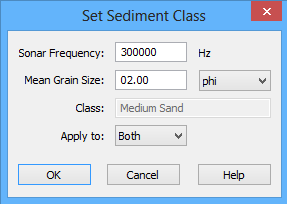
The Class field displays a short description of the sediment indicated by the mean grain size. This will change with the values in the Mean Grain Size field. These values are drawn from the Grain Size table. See Grain Size Table.
Procedure
1. Load a beam pattern
2. Select the Sediment Class command.
The Set Sediment Class dialog box is displayed.
3. Adjust the Sonar Frequency value.
4. Set the Mean Grain Size in units set from drop-down list: phi, mm or mil.
5. In the Apply to field, select to apply the class to: Port, Starboard or Both.
6. Click OK.
