Menu | Tools > Editors > Side Scan > Altitude > Auto Digitize |
Tool |
|
Pop-up | In Side Scan View: Auto Digitize Altitude |
Menu | Tools > Editors > Side Scan > Altitude > Auto Digitize |
Tool |
|
Pop-up | In Side Scan View: Auto Digitize Altitude |
The automatic digitizing method traces the first bottom return using a sophisticated multi-pass algorithm. Automatic digitizing is most effective when there is a clear distinction between the water column and the bottom. This method can be applied to a range of pings or to the entire line.
Settings for automatically digitizing the side scan return are in the Properties window.
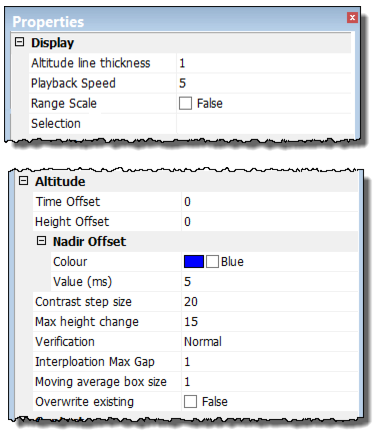
Option | Description |
Altitude line thickness | Set the thickness of the line used to digitize the altitude of Raw data in the waterfall view. (Value from 1 to 8.) |
Time offset | Type a value in seconds to apply a time shift to the altitude data. |
Height offset | Type a value in metres for a fish height offset. |
Nadir Offset | Strong solid returns in the water column, such as surface reflections, can be compensated for by setting an offset from nadir in raw data mode. The nadir line colour is set to Blue. To change colour: 1. Click in the Colour field and select a new colour from the colour picker. 2. Type a value in milliseconds for the Nadir Offset Value. The Contrast Step Size and Max Height Change options must also be set to correctly auto digitize the side scan. |
Contrast Step Size | The Contrast Step Size is the minimum difference in contrast expected between the intensity values of the water column and the sea floor. 1. Set a value for the step size. The Signal Display Window may be helpful in determining a good step size. |
Max Height Change | The Max Height Change is the maximum allowable ping-to-ping change in detected bottom position (in pixels). It is a restriction on the variation anticipated in detected bottom position. It could be visualized as error bars guiding the algorithm along the bottom. 1. Set a percentage for the Max Height Change value. The default is 15. |
Verification | The verification option tests the detected point to see if its intensity is consistent with nearby values further across-track that should also represent sea floor. Its purpose is to detect and ignore anomalous points in the water column (for example, noise from equipment, reflections off the surface, marine life), by checking to see if there is water rather than sea floor on the other side of a detected point. 1. Click in the Verification field and select a desired strength-level for the verification from the drop-down list. Choices range from “None” to “Very Weak” to “Very Strong”. The default is “Normal”. |
Interpolation Max Gap
| The Interpolation Max Gap option fills along-track gaps in the detected bottoms. 1. Select the Interpolation Max Gap field and type a value for the size of the gap to be filled. |
Moving Average box size | This filtering option smooths the digitized line. 1. Click in the Moving Average box size field and type the number of pings to be used for averaging during digitizing. |
Overwrite existing | 1. Set to “True” to enable re-digitization of selected areas without clearing. If set to “False”, only zero-altitude/cleared fish heights will be available for digitization. |
Procedure: Automatic Digitizing
1. Select the Auto Digitize command.
2. Set Properties options.
3. [Optional] Select the Clear command to remove the digitization.
