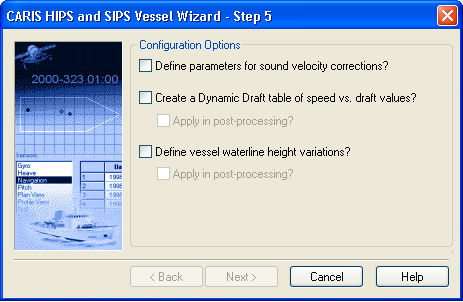
The Configuration Options dialog box is displayed
Use this dialog box to set configuration options:
• SVP (Sound Velocity Profile) pole parameters
• dynamic draft values
• waterline height variation
To include sound velocity corrections:
4. Enable the Define Parameters for Sound Velocity Corrections option.
If you select this option, an extra step is added to the wizard and the Next button becomes active to go to Sound Velocity Corrections.
To apply dynamic draft values to vessel speeds:
5. Enable the Apply Dynamic Draft option.
A draft-versus-speed table is created in the Vessel Editor. You can enter values in this table once the vessel file is created.
To apply long period variations in the waterline height in processing data:
6. Enable the Define Vessel Waterline Height Variation option.
7. Enable the appropriate Apply in Post Processing options, as needed.
8. Click Next if the button is active. Otherwise, click Finish.