Teledyne PDS format can contain multibeam and single beam data. By default, it is multibeam data which is read and converted. You can also convert single beam or dual frequency data, by identifying the devices containing the data.
If converting single beam or dual frequency data you will need to specify which echo sounding device was used. If you are converting single beam data, choose from the ECHO_ID (raw data) or CF_DEPTH (processed data) attributes from the Source type drop-down list. If converting dual frequency data, the only source available is ECHO_ID.
Interface
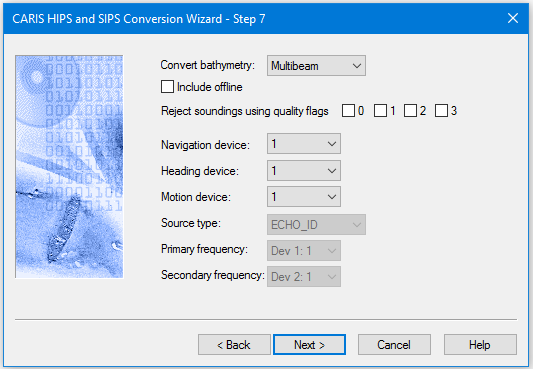
The conversion options for Teledyne PDS data are set in this dialog box:
Procedure
1. Select the type of data being converted (Multibeam, Singlebeam, or Dual Frequency) from the Convert bathymetry drop-down list.
2. Select the Include Offline check box to convert data flagged as offline.
3. Select one or more of the quality flag check boxes to set which flagged soundings will be rejected during conversion.
4. For multibeam data, select the number for the Navigation, Heading and/or Motion devices, from their lists, to convert data from that specific device. (Devices are numbered 1 to 5.)
5. For singlebeam data, set the Source type field to convert records from either a ECHO_ID (raw data source) or CF_DEPTH (processed source) device.
If you select ECHO_ID as the source, select the device and channel where the data is stored from the Primary frequency field.
If you select CF_DEPTH, select either device 1 or device 2.
If you select a device that is not present, or in which the selected depth channel is not available, no depth data is converted. |
For Dual frequency data, you can convert data from both a primary and secondary frequency device, with one of four channels available for each device.
6. Select the device and channel where the data is stored.
If you elect to convert primary data from a device that is not present, or in which the selected depth channel is not available, depths of 0.0 metres will be converted, but all data will be rejected.
If you convert secondary data from a device that is not present, or in which the selected depth channel is not available, no secondary depth data will be converted.