Tool |
|
Pop-up | New Group |
Template groups are folders that contain new or modified features that can be used at templates.
1. Right-click in the Feature Palette.
Tool |
|
Pop-up | New Group |
A pop-up menu is displayed.
2. Select the New Group command.
A new group folder is added.
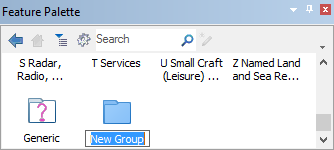
3. Double-click to access the group.
From inside a group, you can use the following tools:
Tool | Description |
| Go back to the most recent group in the palette. |
| Go to the top level of the palette. |
Rename the group as follows:
1. Right-click on the folder and select Rename from the pop-up menu.
2. Type a new name.
To save a template group:
1. Select Tools in the Feature Palette tool bar.
Tool |
|
A menu is displayed.
2. Select Save As.
A Save As dialog box is displayed.
3. Type a name for the template.
4. Click Save.
The template group is saved as an XML file with the extension .fpal.


