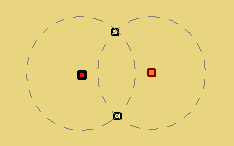
This tool is used to create two possible arc centres at the intersecting positions on the radii of two selected points in your reference model. New arc centres can be used to create new alignments.
1. [Optional] Use a selection tool (Select By Range or Select By Lasso) to select points in the reference model.
For information on using selection tools, see the Select Menu chapter in the CARIS BASE Editor Reference Guide.
Menu | Model > New Feature > Point > At Arc Centres |
2. Select the (New Feature, Point) At Arc Centres command.
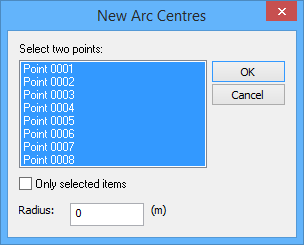
The New Arc Centres dialog box is displayed.
3. Select two centre points.
4. [Optional] To list only points selected in the model, select the Only selected points option.
The arcs must intersect so the Radius value must be at least half of the distance between the points you selected.
The Measure Distance and Angle tool can be used to accurately determine the distance. See the Measure Distance and Angle topic in the CARIS BASE Editor Reference Guide for more information. |
5. Type a Radius value for the size of the arcs.
6. Click OK.
The possible arc centres are drawn in the Display window (dashed line circles are not displayed).