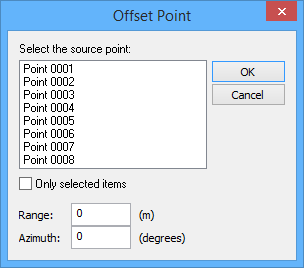
This tool is used to create a new point “offset” from a selected source point in your reference model. The offset point is created and positioned, relative to the source point, by distance and azimuth (the angular distance, 0 to 360, measured clockwise from due north).
1. Locate one or more source points.
2. [Optional] Use one of the selection tools (Select By Range or Select By Lasso) to select one or more source points.
If you select your source points before you select the Offset Point command, you can choose to have only the points you selected listed for selection in the Offset Point dialog box. Otherwise, all points in the model are listed for selection.
For information on using selection tools, see the Select Menu chapter in the CARIS BASE Editor Reference Guide.
3. Select the (New Feature, Point) From an Offset command.
Menu | Model > New Feature > Point > From an Offset |
The Offset Point dialog box is displayed.
4. [Optional] To display only the points you selected in Step 2 in the Select a source point list, select the Only selected items option.
5. Select a point from the Select a source point list.
6. Type a range value.
7. Type an azimuth value.
8. Click OK.
The process is finished and the new point is drawn in the Display window.
9. [Optional] Repeat Steps 3 to 8 to create additional offset points for each source point selected.
Points can be modified using the Model Feature window if desired. See Modify a Point for more information.