Menu | File > Print Setup |
Set the defaults used for printing.
If you change the paper size or change to a printer that cannot handle large sheets of paper, part of the view may not print because portions are outside the printable boundaries of the current page. |
Related commands: Print.
Procedure
1. Select the Print Setup command.
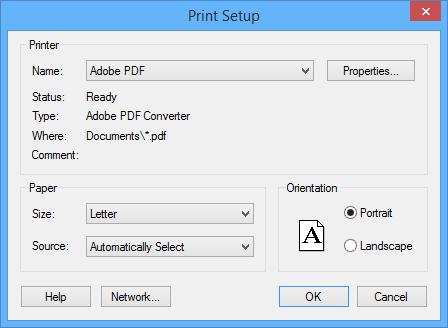
The Print Setup dialog box is displayed.
Option | Description |
Printer | Name: The printer to use. Select from the list. The Status, Type, Where, and Comment fields are read-only. |
Paper | Size: The paper size. Select from the list. Source: The printer tray containing the paper. Select from the list. |
Orientation | Select one: • Portrait: Vertical • Landscape: Horizontal |
Command buttons:
Button | Description |
Properties | Set properties of the selected printer. |
Network | Select a network connection and a printer on the network. |
2. Set any necessary options.
3. Click OK.