When an S-57 file is opened, the application automatically reads the catalogue associated with the file and uses it to display the data with the correct representations.
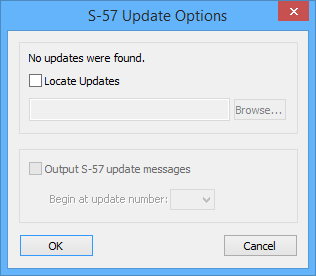
At the time of opening, the application will check for updates to the data. If updates exist and they are located in the same directory, the file will automatically be up-to-date. If there are no updates in the folder with the file, the S-57 Update Options dialog box is displayed.
Option | Description |
Locate Updates | On: If your updates are in a different folder, click Browse to locate them. Off: Do not look for updates. Use this if there are no updates or if you don’t want to open them. |
Output S-57 update messages | On: Detailed information about the update or updates is displayed in the Output window. The Begin at update number option becomes available. This lets you display detailed information only for the latest updates. Select a starting number from the list. Off: No information is displayed. |
1. If your updates are in a different folder, enable Locate Updates.
2. Click OK.
The file is opened.