Menu | Tools > Features > Depth Areas from Contours |
The Depth Areas from Contours command is used to generate depth area feature objects using the extents and values of existing contour features.
Creating depth areas through this process sometimes results in isolations. Isolations are depth areas, created from closed contours, that only have one known depth range value. These depth areas are missing the second value that is needed to determine the depth range. Without additional information, it is unclear whether the depths in these areas are greater or less than the one known depth value. Isolations can be resolved by:
• Setting the Isolation Type (isotyp) attribute on the closed contours from which the depth areas are being generated. This attribute defines whether each closed contour is a shoal or a deep and depth range values are assigned to the depth areas accordingly. The isotyp attribute is populated automatically when new contours are generated using the Bathy DataBASE catalogue; existing or third-party contours will need to have this setting defined manually. See “Contouring” on page 637 for more information on defining the isotyp attribute. If the isotyp value is set, the isolation can be populated with a second depth range value as long as an appropriate value is available in the existing contour values or the minimum/maximum value. The contents of the height source are ignored in this case.
• Specifying a height source from which elevation values are read for the area within the contour. The height source can be in the form of a raster surface or a TIN. The TIN can be generated from a point cloud or a feature layer containing objects with elevation values. If the isotyp attribute is not defined, the elevation values are analyzed to determine if the contour contains a shoal or a deep and the missing depth range value is selected accordingly. If the height source contains values inside the depth area that are both shoaler and deeper than the known depth range value, it is not possible to attribute the isolation without using the isotyp attribute.
• Defining minimum and/or maximum depth range values for the depth areas if the existing contour values are not sufficient. In many cases, isolations may contain points shoaler or deeper than any of the contour values. By specifying a minimum and/or maximum beyond the values of the contours in the file, along with the elevation values in the selected height source and the isotyp attribute, it is possible to meaningfully attribute the isolation depth areas.
Contours that intersect boundaries and do not contain additional contours will also result in depth areas that are missing attribution. The attributes for these depth areas will also be populated using the height source selected for resolving isolations. If the existing contour values do not contain the necessary values, the minimum or maximum values may also be required.
Interface
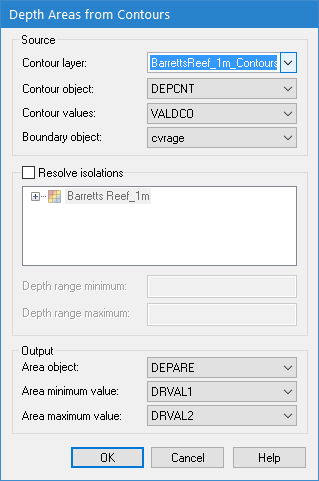
The Depth Areas from Contours command uses the following dialog box.
Option | Description |
Contour layer | The layer on which to create the new depth areas. The list is populated with any vector layers currently open in the application. |
Contour object | The object acronym of the contour features that will be used to create the depth areas. The list is populated according to the object acronyms present in the selected feature layer. |
Contour values | The attribute acronym of the elevation values for the contour features. The list is populated based on the selected object acronym. |
Boundary object | The boundary object type of the contours being used. |
Resolve isolations | The settings to use for resolving isolations. 1. Click the check box to enable the Resolve isolations option. 2. Select a height source from which elevation values are to be read. 3. [Optional] Enter values for Depth range minimum and/or Depth range maximum to define the range of values that can be assigned to the depth areas. |
Area object | The object acronym to assign to the new depth area features. |
Area minimum value | The attribute acronym to use for the minimum value of the depth range of each depth area. |
Area maximum value | The attribute acronym to use for the maximum value of the depth range of each depth area. |
Procedure
1. Open or create contour feature data.
2. If isolations will be resolved during depth area creation, open a surface to act as a height source.
3. Expand the Contour layer list and select the feature layer containing the contours.
4. Select the object acronym of the source contours from the Contour object list.
5. Select the attribute acronym being used for the values of the contours from the Contour values list.
6. Select the type of boundary object applied to your contours from the Boundary object list.
7. [Optional] Enable the Resolve isolations option and then select a height source and define the Depth range minimum and Depth range maximum options.
8. Select an object acronym to assign to the Area objects.
9. Select the attribute acronyms to use for the Area minimum value and Area maximum value.
10. Click OK.
The depth areas are created and stored in the same feature layer as the contours.
Depth areas may have been created with incomplete attribution if the isotyp value was not set and:
• depths within the area were inconsistent with the contour values
• depths within the area went outside the values specified for Depth Range Minimum and Depth Range Maximum
In these cases, the depth value attributes will be populated as either UNKNOWN/UNKNOWN, <value>/<value>, or <value>/UNKNOWN. Appropriate error messages will be displayed in the Output window for each incomplete depth area.