Menu | Select > Collections |
This command lets you select and view existing collection objects.
A collection is a special S-57 object that contains information about relationships between objects. Collection objects can contain other collection objects. These objects do not have any spatial representation and, unlike other objects, they cannot be filtered or selected using standard tools in a Teledyne CARIS application.
Related commands:
• Select Features Inside Areas | • Remove Others from Selection • Remove |
Interface
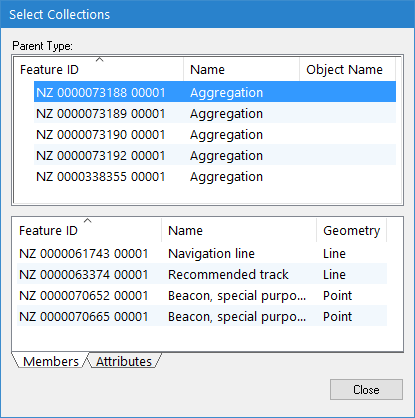
The Select Collections command uses the following dialog box.
Panel | Description |
Parent Type | Contains the following information about the collection: • Feature ID: The feature object ID • Name: The collection object type • Object Name: The user-specified name assigned to the collection object |
Members | Contains a list of the collection members. |
Attributes | Contains the attributes of the selected collection. |
Procedure
1. Make a layer active.
2. Select the Select Collections command
You can add all members of one or more collections to the existing selection or create a new selection containing the members of the selected collections.
3. In the Parent Type list, select one or more collections.
4. Right-click and select Add Members to Selection or Create Selection from Members from the pop-up menu.
You can add one or more members of a collection to the existing selection or create a new selection containing selected members.
5. In the Members list, select one or more members.
6. Right-click and select Add Members to Selection or Create Selection from Members from the pop-up menu.
7. Click Close.