An ENC reissue cell is a single file that contains all information from the current edition plus all updates. ENC reissues do not contain any information that is not already provided in the current edition and its updates.
Reissue cells are created by merging the update instructions in ENC update files with an S-57 base cell file, creating a single ENC reissue file (.000). This is useful when the ENC has many updates because everything is written to a single .000 file.
It is recommended that you copy the exchange set and modify the copy. |
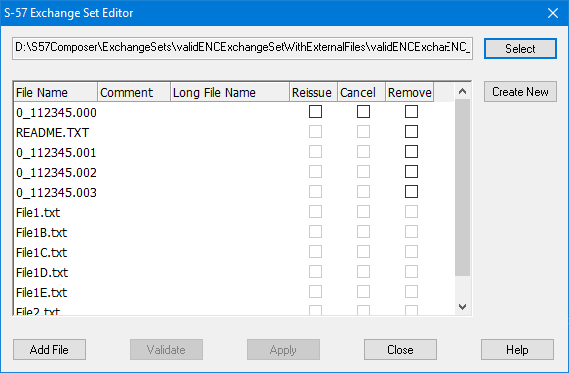
If necessary, open the Exchange Set Editor and select the S-57 ENC exchange set and catalogue.
The contents of the exchange are listed in the dialog box. The base cell (.000) is in the first row.
1. Enable the check box in the Reissue column of the base cell row.
The check boxes in the Remove column become active for all files in the list.
2. Click Remove for any necessary files.
3. Click Validate.
If any messages are generated, they are displayed in the Validation window.
4. Click Apply.
Messages are displayed in the Output window.
The ENC reissue file is created, the contents of the ENC exchange set are updated, and the information is recorded in the file called CATALOG.031.
The ENC base cell is updated and any update files are removed from the exchange set.
5. Click Close.
The update process is completed.
The ENC_ROOT folder now contains:
• The updated ENC catalogue file, CATALOG.031.
• The updated S-57 ENC cell file, 1Cxxxxxx.000.
• External text or image files (if any) associated with ENC objects in the original file and ENC updates file.
• An optional text file which contains information about the exchange set, such as name, location, content, and other general notes of help to end users. This is called README.TXT and can be edited using a text editor.
S-57 ENC reissue exchange sets can be opened as backdrops for viewing, selecting, filtering, and so on.