 0
0
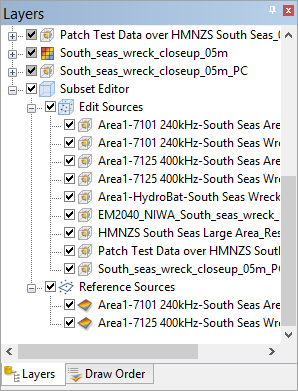
When a subset is loaded in the Subset Editor, Subset Editor layers are added to the Layers window.
Edit Sources
All datasets within the bounding box that can be loaded into the Subset Editor are listed under the Edit Sources layer. The check boxes beside these layers can be used to turn each data source on or off in the subset views. By default, all sources are turned on. If the bounding box is moved, the list of sources will be updated automatically, adding or removing the sources that are within the new range of the bounding box.
0
When multiple sources are turned on in the subset views, any edits made to the status flags will be applied to all selected soundings in all sources.
Datasets can be added to and removed from the list of sources manually, if needed.
2. To add a dataset to the list, right-click the dataset in the Layers window and select Add to Subset Edit Sources.
3. To remove a dataset from the list, right-click the dataset in the list and select Close.
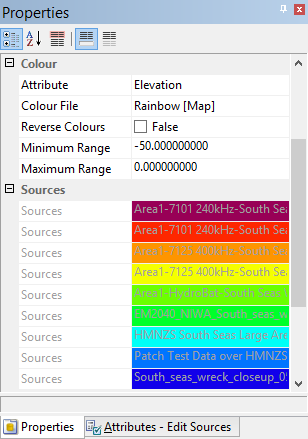
Each dataset listed under Edit Sources is assigned a display colour in the Properties window. The display in the subset views can be coloured according to any of the attributes in the data sources using the Attribute property under the Colour properties group. If colouring by the Source attribute, the data will be displayed using the colours assigned in the Sources property list.
Reference Sources
The Reference Sources layer is used to display coverages as reference sources in the subset views. For example, the Depth or Elevation band of another coverage can be displayed as a reference when assessing points.
To use a coverage as a reference source:
4. Right-click the attribute layer of the coverage that you want to use as a reference.
5. Select Add to Subset Reference Sources.
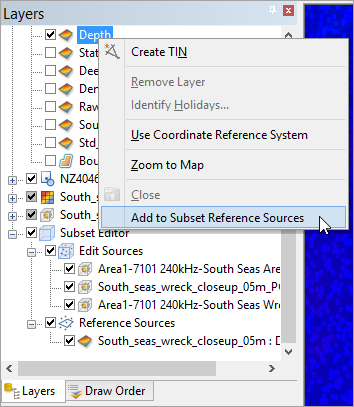
The selected attribute layer will be listed under the Reference Sources layer and added to the Subset Editor - 3D View. All layers added here are turned on by default. The check boxes beside the layers can be used to turn the reference sources on and off.
6. To remove a reference source, right-click the layer in the list and select Close.
Subset Layer Properties
When the Subset Editor or Edit Sources layers are selected, the Properties window contains settings that can be used to adjust the display in the subset views. The description panel at the bottom of the Properties window provides a brief description of each available property.
The Auto Load property for the Edit Sources layer allows automatic loading of subset data in the 2D and 3D Views when a subset area is created or changed. To create or adjust a subset area without immediately loading data, turn this option off. If you wish to load data while this option is disabled, draw the subset and select the Load Subset command.
Tool |
|
Any properties defined will be remembered the next time the Subset Editor is launched.
