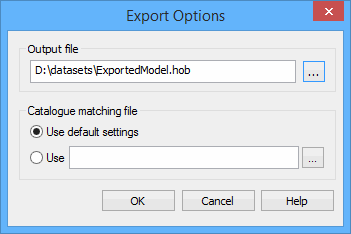
Export open reference model data to a Hydrographic Object Binary (HOB) file.
During the export, features and their attributes will be mapped according to a catalogue matching file. By default, surfaces are exported as $AREAS, templates are exported as DRGARE, and lines and profiles are exported as $LINES. Alternatively, if you want to use S-57 objects, there is a sample catalogue matching file located at:
C:\ProgramData\CARIS\BASE Editor\<version>\SampleData\
catalogue_matching_file.xml
If neither of these options suit your needs, you can manually create a new catalogue matching file specifying alternate settings.
To create a matching file, see Create a Catalogue Matching file
To export to a HOB file:
1. Open a reference model if one is not already open.
2. Select the (Export) Model to HOB File command.
Menu | File > Export > Model to HOB File |
The Export Options dialog box is displayed.
3. Click the Output file browse button (...) to select a location for the file.
A Save As dialog box is displayed.
4. Select a location and file name
5. Click Save.
The Save As dialog box is closed; the Export Options dialog box is redisplayed.
Next you must select the mapping settings for assigning object and attribute acronyms during export. This can be done with the default settings in the application, or a catalogue matching file. The sample catalogue matching file can be used, or users can create their own files.
6. Choose a Catalogue matching file option.
If you chose to use the default settings, go to step 8. If you chose to use a catalogue matching file, continue with step 7.
An Open file dialog box is displayed.
7. Select a file and click Open.
You are returned to the Export Options dialog box.
8. Click OK.
The process is finished. The Output window states whether the export was successful or not.
Inclined surfaces have no single depth value, so depths are not exported for inclined surfaces. Similar warnings will be displayed when specific features do not contain the information that is requested to be exported. |