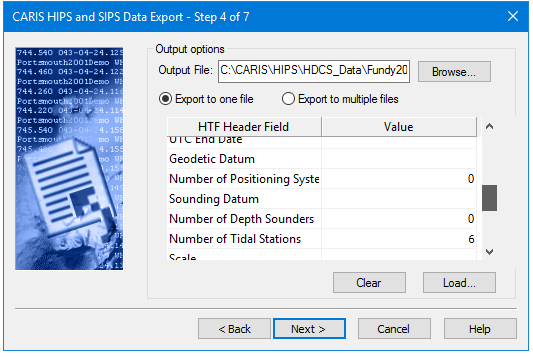
The HIPS and SIPS Export Wizard converts data and soundings to a Hydrographic Transfer Format (HTF) file.
See HTF Reference for format information.
After setting the location of the output file, the header field and value information must be set. This can be directly entered or loaded from an existing HTF Template file.
To enter data such as the number of depth sounders or tidal stations, click in the Value field next to the appropriate HTF Header Field and type the data, or it can be loaded from an HTFT file.
See Hydrographic Transfer Format Template for information on this format.
If you are exporting soundings, you can export all data to a single file or export data from each survey line to its own file.
Output Options for exporting to HTF are in this dialog box:
Procedure
1. Select an output location for the HTF file(s).
2. Select either Export to One File, or Export to Multiple Files,
3. Click in the Value field next to the appropriate HTF Header Field and type data.
4. [Optional] Click Load to open data from an existing HTFT file into the Value fields.
5. Click Clear to remove data from all fields, if needed.
6. Click Next.