Menu | File > Import > Auxiliary Data > Tide |
Tool |
|
Menu | File > Import > Auxiliary Data > Tide |
Tool |
|
Tidal observation data must be loaded for every track line before the Merge process can be executed. Tide data is used to generate final depths relative to the tide datum by subtracting the tide from the sounding depth.
There are two options for tide loading:
• load a *.tid file to apply tide observations from a single station. (For information on these files, see Tide Files.)
• load a *.zdf file to apply tide observations from multiple tide stations to a tide zone. (For information on these files, see Tide Zone Files.)
See also: Display tide zones.
Tide stations and weighted average
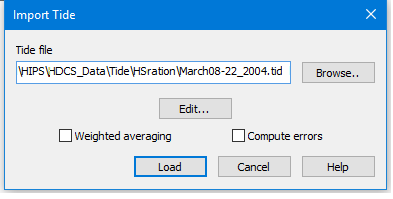
If you are loading a tide zone (.zdf) file, you have the option of applying weighted averaging from the multiple tide stations.
When an average tide is calculated from multiple tide stations, the weight given to a tide station’s data is inversely proportional to its distance from the vessel at that time. In other words, the further a station is from the survey line, the less weight is accorded to the data from that station, and the greater weight is given to data from the closest tide station.
If the selected tide file doesn’t contain any averaging options, this option is not available.
Compute Errors
The Import Tide process can save computed errors to a tide error file for each line. These tide error files will then be used in computing TPU.
If the selected tide file does not contain any error parameters, this option is unavailable.
Interface
The Import Tide dialog box is used to load tide.
Procedure
1. Select the track line(s).
2. Select the Load Tide command.
3. Click Browse… to choose a *.tid file for single station data, or a *.zdf tide zone file.
4. Click Open.
5. [Optional] To revise the contents either type of tide file, click Edit to open the Tide Editor.
6. Select the Weighted Averaging check box to apply this option.
7. Select the Compute Errors check box to have the Load process save computed errors.
8. Click Load.
The tide data is loaded into the selected track lines from the tide zone definition file.
