Menu | Tools > Editors > Vessel |
Tool |
|
To open the Vessel Editor:
1. Click the Vessel Editor button on the Tools toolbar or select the command from the Tools menu.
Menu | Tools > Editors > Vessel |
Tool |
|
In Vessel Editor:
2. Select the New Vessel File command.
Menu | File > New |
Tool |
|
The Vessel Wizard - Step 1 (Vessel Information) dialog box is displayed.
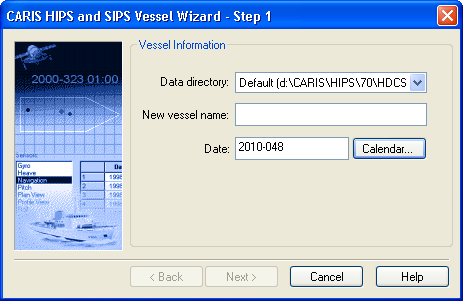
The HVF will be saved to the \VesselConfig folder in your data directory.
1. Select the directory holding your data, from the drop-down list.
2. Type a name to identify the vessel used in the survey.
The name must not include any spaces.
3. Click the Calendar button to insert the year and day the survey began.
The Vessel Date must be before the start of your data collection.
4. Click Next. Type of Survey.

