Menu | Process > Merge |
Tool |
|
Menu | Process > Merge |
Tool |
|
The Merge process converts along track/across track depths in raw data into latitude, longitude, and depth by combining the ship navigation with the horizontal and vertical offsets from the HIPS vessel file. This geographically references the sounding position and depth. See Merge Process.
Track line data must be Merged before surfaces can be created and before surface cleaning can be performed. Sound Velocity Correction must be applied before Merge. (see Sound Velocity Correction (using CARIS Algorithm or Kongsberg Library))
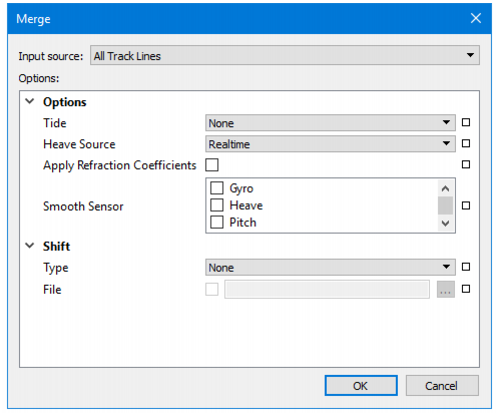
Option | Description |
Input Source | The Input Source field defaults to Selection if you select a line or lines before opening the Merge dialog box. To change to All this, select All Track Lines from the list. If no lines are selected before starting Merge the process will be applied to All Track Lines. |
Tide | None: No tidal correction will be applied. This is the default setting. Observed/Predicted: Observed tidal corrections will be applied. GPS: GPS tidal corrections will be applied. |
Heave Source | 1. Select Delayed from the Heave Source list to apply delayed heave values instead of Realtime heave. If you choose this option, and no delayed heave data is available, there will be a warning message in the Output window, and regular heave data will be used instead. |
Refraction Coefficients | 1. Select the Refraction Coefficients check box to apply any data created in Refraction Editor. See Refraction Editor. |
Smooth Sensor | If a 1. Select the sensor by name from the list. |
Shift: Type | Aper beam shift to the processed depth solution from a beam look-up table. The beam shift look-up table consists of two columns, one contains the beam number and the other the value of the shift. Only the beams listed in the table will be shifted. For example: Beam number, Shift Value 1,2 2,2 3,2 22,3 75,1 The values can shift statically or by percentage of the water depth of the sounding being shifted. • None: No beam shift will be applied • Static: Static beam shifts will be applied - as a straight shift (positive down, depths get deeper) • Relative: Relative beam shifts will be applied as a percentage of the depth being shifted. The default value is None. |
Shift: File | Browse to the file containing the beam shift look-up table. |
Lines must have tide loaded before they can be merged.
Procedure
1. Select a line or group of lines.
2. Select the Merge command from the Process menu or toolbar.
3. Select Input source.
4. Set options.
5. Click OK to Merge.
If a line is merged and then changes are made to the sensor data used by merge, the track line in the Project window is marked with the Outdated icon. As well, the Outdated field for that line is set to “Yes” in the Selection window. An Outdated track line must have Merge applied again. |
 Process toolbar