Menu | Process > Beam Pattern > Create > Side Scan |
Tool |
|
Menu | Process > Beam Pattern > Create > Side Scan |
Tool |
|
Beam pattern files can be created from lines selected in the Display window, or from all open track lines.
Beam pattern files can also be created from a range of pings selected in the waterfall view in Side Scan Editor.
Interface
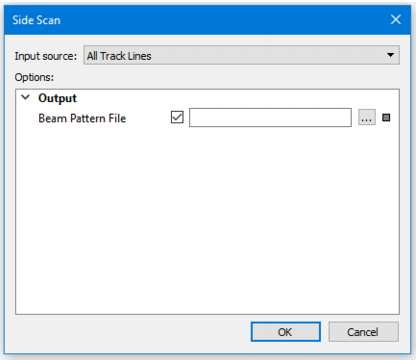
Beam pattern creation using SIPS Side Scan uses the following dialog box:
.
Option | Description |
Input Source | The source of the data: • To create the beam pattern file from the selection, set the Source field to Selection. • To create the beam pattern file from all open lines, select the All Track Lines option in the Source field. |
Beam Pattern File | Name and destination folder for the beam pattern file. 1. Click Browse in the File Name field and enter a name for the beam pattern file. 2. Click Save. |
1. Select the input source.
2. Set the name and designation of the beam pattern file.
3. Click OK to create the side scan beam pattern file.
The new file will have a *.bp extension.
You can view a loaded beam pattern in the Signal Display window, where it will appear as a yellow line. See Open Signal Display Window.
