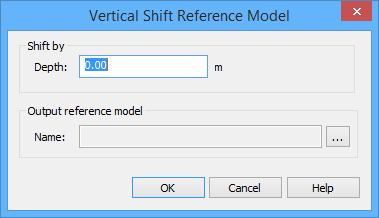
The Vertical Shift Model command is used to apply a vertical shift to all line and surface points in a reference model. No changes will be made to the original reference model. Instead, a new reference model will be created with the shifted values.
To apply a vertical shift to a reference model:
1. Open the reference model that you want to shift.
2. Select the reference model in the Layers window.
A reference model must be selected in order for the command to be enabled. |
3. Select the Vertical Shift Model command.
Menu | Model > Vertical Shift Model |
The Vertical Shift Reference Model dialog box is displayed.
The Shift by: Depth field is used to specify the amount by which to shift the depth values of the line and surface points. This value will be applied in the unit of measure currently selected for the Depth setting in the Display Units options.
The name of this field will change based on the Z-axis convention setting. "Depth" is used when the Z-axis convention is positive down, "Height" when the convention is positive up. |
4. Enter a shift value.
5. Click the Browse (...) button for the Output reference model: Name field.
A Save As dialog box will be displayed.
6. Enter a name and select a location for the new reference model then click Save.
7. Click OK to apply the shift.
A new reference model XML file is created in the specified location with the specified name. This new reference model is also opened automatically.