Pop-up | Find (Output window) |
Find text in the Output window.
Related commands:
• Clear
• Save All
Procedure
1. Right-click in the window.
2. Select the Find command.
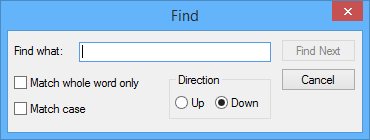
The Find dialog box is displayed.
Option | Description |
Find what | The text to search for. Type in the box. |
Match whole word only | On: Find the search text only if it is a whole word. Off: Find the search text even if it is part of a another word. |
Match case | On: Find the search text only if it matches the case entered. Off: Find the search text regardless of case. |
Direction | Search upwards or downwards from the cursor. |
3. Type the text in the Find what box.
4. Set any other necessary options.
5. Click Find Next.
Found text is highlighted.