Menu | View > Change Scale |
Tool |
|
Menu | View > Change Scale |
Tool |
|
Zoom in or out of the display in the Display window by changing the viewing scale.
Related commands:
• Zoom In
• Zoom Out
Procedure
1. Select a layer.
2. Select the Change Scale command.
The Change Scale dialog box is displayed.
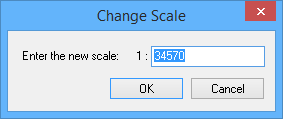
Option | Description |
Enter the new scale | The scale denominator for the display. |
3. Type a scale denominator.
4. Click OK.
The data in the Display window is displayed at the new scale.
