Menu | Tools > Profile > Cross Profile |
The cross profile tool enables multiple perpendicular profiles to be generated at regular intervals along a line.
The measurements for the profile intervals are done based on the current coordinate system of the view. If the view is using a geographic coordinate system, only geodetic measurements are supported.
Related commands:
Interface
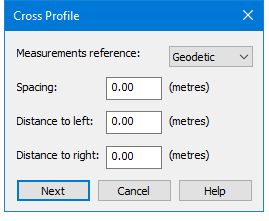
The Cross Profile command uses the following dialog box.
Option | Description |
Measurements reference | The measurement format to use for the cross profile creation. |
Spacing | The interval at which to create the cross profiles. |
Distance to left | The length of the profile to the left of the line feature for which the profiles are being created. |
Distance to right | The length of the profile to the right of the line feature for which the profiles are being created. |
Procedure
1. Select a feature or profile layer in the Layers window.
2. Select the line feature for which cross profiles are to be created.
3. Select the Cross Profile command.
4. Select a measurement format from the Measurements reference drop‑down list
5. Enter values for the Spacing and Distance measurements.
6. Click Next.
The Profile Settings dialog box is displayed. See Create Profile for information on this tool.
7. Define all necessary profile settings.
8. Click OK.
Profile lines are generated perpendicular to the selected line.