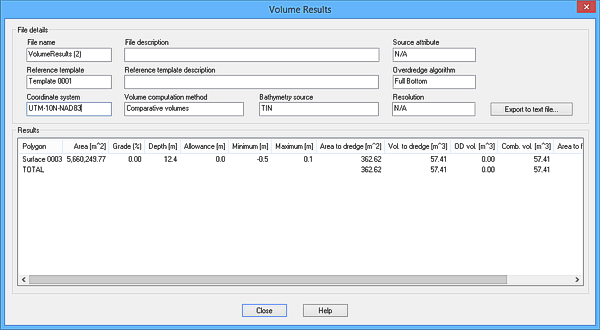
The Open Results command is used to view the results from a saved volume computation.
1. Select the Open Results command.
Menu | Tools > Engineering Analysis > Volumes > Open Results |
An Open dialog box is displayed.
2. Select the volume results (XML) file to open.
3. Click Open.
The Volume Results dialog box is displayed, populated with the data from the XML file.
The File details section of the Volume Results dialog box displays the metadata for the volume results. The Results section displays the actual volume results.
The following information is provided in the Results section:
• Polygon: name of the polygon; typically the name of the reference model surface
• Area: area of the polygon
• Grade: slope of the polygon, reported as a percentage. For example, a 90 degree slope is the largest theoretical slope possible and would be shown as 100.00 in the results. A 45 degree slope is 50% as large, so a 45 degree slope would be shown as 50.000 in the results.
• Depth: depth of the polygon
The Depth result applies to horizontal polygons only. |
• Allowance: the additional allowance below the polygon depth. This depends on the algorithm selected, which is used to calculate the volume.
• Minimum: shallowest value of the bathymetry or TIN in the polygon area. For two TIN volumes, this is the smallest value of the difference of the reference TIN from the source TIN, for the areas of the TINs above the polygon depth.
• Maximum: deepest value of the bathymetry or TIN in the polygon area. For two TIN volumes, this is the largest value of the difference between the reference TIN and the source TIN, for the areas of the TINs above the polygon depth.
• Area to dredge: area where the bathymetry is above the polygon depth. For two TIN volumes, this is the area where the reference TIN was above the source TIN, above the polygon depth.
• Vol. to dredge: volume of the material above the polygon depth. For two TIN volumes, this is the volume of material where the reference TIN was above the source TIN, above the polygon depth.
• OD vol.: volume of overdredged material for each polygon
• Comb. vol.: the sum of the volume to dredge and the overdredge volume (OD vol)
• Area to fill: area where the bathymetry is below the polygon depth. For two TIN volumes, this is the area where the source TIN was above the reference TIN, above the polygon depth.
• Vol. to fill: volume of the material below the polygon depth. For two TIN volumes, this is the volume of material where the source TIN was above the reference TIN, above the polygon depth.
This information can be exported to a text file for future reference, if desired. See Export Volume Computation Results for more information.