Elac format, as stored in *.xse files, can store multibeam and side scan data.
Interface
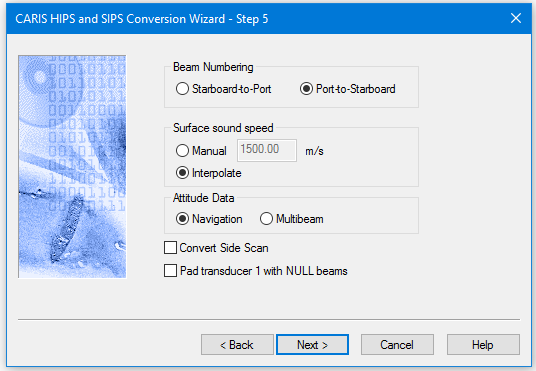
Options for converting ELAC data to HIPS are displayed in this dialog box:
Option | Description |
Beam Numbering | During conversion, XSE-format beams are numbered according to the sounding’s position along the swath (in relation to the vessel). Port-to-Starboard is set by default. |
Surface Sound Speed | Select Manual to specify a user-defined surface sound speed. By default, a sound speed is interpolated from the stored sound velocity profile. Interpolate setting is the default. |
Attitude Data | Set Navigation to use Navigation records as source of attitude. (default). [Optional] Set Multibeam to use multibeam records as attitude source. |
Convert Side Scan | Select check box to convert side scan data. |
Pad Transducer | Select check box to replace missing data with NULL (rejected) beams in the case of dual head data where the data from head 1 is missing. |
Procedure
1. Set options or accept defaults.
2. Click Next to continue conversion process.