EdgeTech JSF format, as stored in *.jsf files, can store bathymetry and side scan data.
Interface
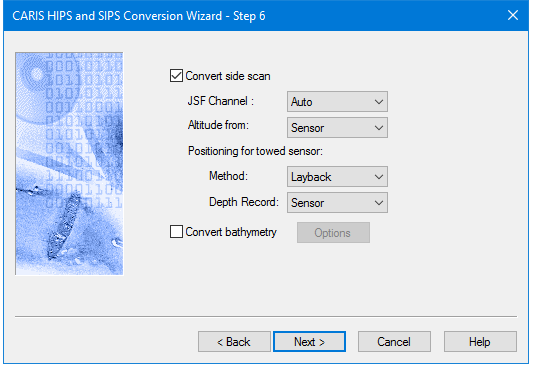
Options for converting Edgetech JSF data to HIPS are displayed in this dialog box.
Option | Description |
Convert Side Scan | The check box is enabled by default, to enable conversion of side scan data. To omit conversion of side scan data, de-select the check box. This will also disable the options listed below it. |
JSF Channel | Select the frequency channel to convert. Auto is the default setting • None: no side scan is converted • Auto: converts low frequency if it exists • High: High frequency • Low. low frequency |
Attitude from: | • Select Sensor or Discover-2. Sensor is the default setting |
Positioning for towed sensor | • Method: Select Layback or Cable out. Layback is the default setting. • Depth record: Select from Sensor or Discover-2. Sensor is the default setting. |
Convert Bathymetry | To convert JSF bathymetry data, 1. Select the Convert bathymetry check box. |
Procedure
1. Set options.
2. Click Next to continue conversion process.