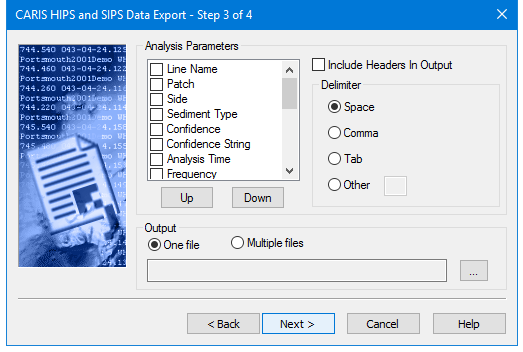
Export the results of sediment analysis. You can select which parameters to export, and the order they will be displayed, as well as the type of delimiter to be used in the ASCII file.
If you are exporting the sediment analysis data from more than one line you can export the data to a single file or to a file for each line.
Procedure
1. To include a parameter in the ASCII output, select its check box in the Analysis Parameters list. You can select more than one parameter at a time.
2. Use the Up and Down buttons to change the order in which the data will be shown in the output file.
3. If you want to include the parameter names as column headers in your output file, select the Include Headers in Output check box.
4. Select the type of delimiter you want to use to space the data in your output file. If you select Other, type the character you want to use.
5. Select One file or Multiple files.
6. Click Browse […] and select the destination folder for the output file(s).
7. Type the name of the file if output is going to a single file.
8. Click Next.