The Generic Sensor Format (GSF) to HOB export loads soundings and track lines from one or more GSF files to a HOB file. GSF data does not have to be converted to HIPS data prior to using this utility.
Export options include soundings and track lines.
• Soundings. Export all soundings that fit within the boundaries of the work file (subject to the HIPS Sounding Status and Data Thinning settings).
• Track Lines. Export a line that connects the centre of each swath for each survey line, thus showing the track of the vessel along each survey line. It is not necessary to export soundings to use this option.
Related command
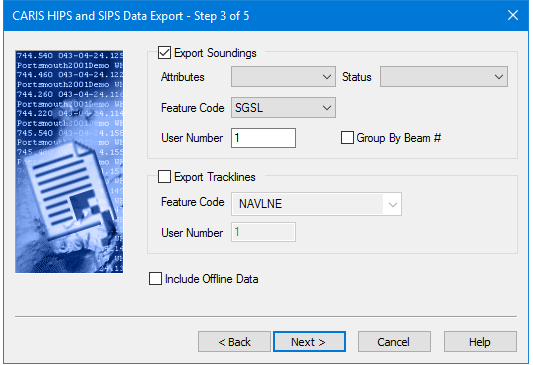
Export options are set in this dialog box:
Option | Description |
Attributes | 1. Select Basic or Advanced from the drop-down list. • The Basic Attributes option creates mandatory CARIS feature attributes for the map file, such as feature code, user number and source ID. • The Advanced Attributes option creates additional CARIS feature attributes for soundings such as time stamps, launch identifier and tidal correction. |
Status | 1. Select soundings flagged as Selected, Accepted or Accepted and Rejected. |
Feature Code | 1. Select a feature code for the soundings from the drop-down list |
User Number | 1. Type a number value for layering data in the HOB file. |
Group By Beam # | Load soundings into user numbers according to sonar beam number. For example, all soundings from beam 37 are loaded to user number 37 in the CARIS map file or HOB file |
Feature Code | Select a feature code for the track lines object from the drop-down list. |
User Number | Type a number value for layering data |
Procedure
1. Select either Export Soundings or Export track lines or both
2. Set related options.
3. Select the Include Offline Data check box to include data recorded during turns between track lines.
4. Click Next to set the location of the output file.