The Add Tide dialog box is displayed.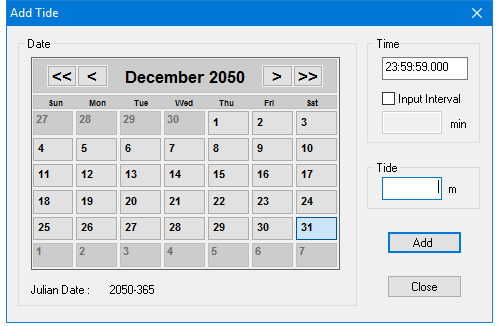
Enter data for a new or existing tide file.
1. Select the Add Tide command.
Menu | Edit > Add Tide |
Key | <Insert> |
The Add Tide dialog box is displayed.
2. Change the date (if necessary) by clicking the arrow buttons at the top of the calendar until you have selected the desired month and year.
3. Click the appropriate day button on the calendar.
The selected date (year and day) is displayed below the calendar.
The default time is the time of the currently selected tide record.
4. Click any of the three sections (00:00:00) in the Time box so they are highlighted and type the desired time (use the 24-hour clock).
The Input Interval option enables you to quickly enter a series of tide values at a regular time interval, using the <Enter> key. You do not need the mouse to move the cursor between fields.
5. If you want to regularly increment the times for tide data, click the Input Interval check box.
6. Enter the minutes that the time value is to be incremented.
7. Enter a tide value.
8. Click OK.
The new tide data is displayed in the editor. If you selected the Input Interval option, the time is incremented by the value set in the Input Interval box.