Menu | File > Import >Auxiliary Data > Multiple Detections |
Tool |
|
Menu | File > Import >Auxiliary Data > Multiple Detections |
Tool |
|
The Import Auxiliary Data - Multiple Detections command will import additional bottom detections per beam for use in HIPS processes. Kongsberg Extra Detections and Teledyne Reson Multi-Detect data records will be saved as Additional Bathymetry.
Interface
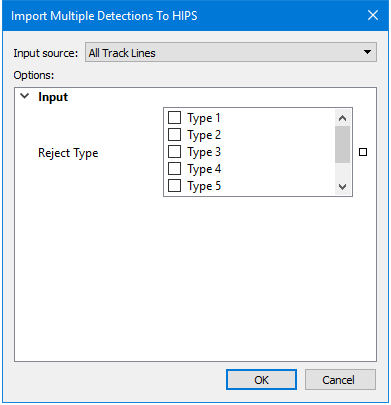
This data is imported using the Import Multiple Detections to HIPS dialog box.
Procedure
1. Select line(s) to import. Unless specific track lines are selected, data from all track lines will be imported.
2. Select check boxes for any Reject Types of detections to exclude from the import. Type 6 and 7 apply to Kongsberg systems only.
3. Click OK.
For Kongsberg systems, setting these flags will override the acquisition settings.
