Menu | Tools > Engineering Analysis > Shoals > Display Depth Annotations |
Tool |
|
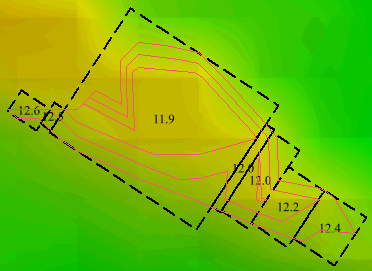
The Display Depth Annotations command is used to display the shoalest depth of the sections of shoal areas covered by each shoal box. The unit of measure assigned to the annotations is determined by the settings in the Display Units tab of Options. See the Tools Menu chapter in the CARIS BASE Editor Reference Guide for more information.
To display depth annotations:
1. Select the Shoal Boxes layer in the Layers window.
2. Select the Display Depth Annotations command.
Menu | Tools > Engineering Analysis > Shoals > Display Depth Annotations |
Tool |
|
The depths are displayed in each shoal box.