Menu | Tools > Engineering Analysis > Shoals > Determine Reference Features |
Tool |
|
The Determine Reference Features command is used to associate shoal boxes with the closest feature in a reference layer. Using features as a reference allows mariners to easily locate a nearby shoal by first locating the referenced feature. If a feature is within the shoal area, it will be chosen as the reference. If there is more than one feature within the shoal area, the object closest to the centre of the shoal will be chosen as the reference feature.
If the features with which you are planning to associate the shoal boxes are from an S-57 file, you should create a filtered layer before you use this command. For more information on creating a filter layer, see the Create Filtered Layers topic in the CARIS BASE Editor Reference Guide.
To define the reference layer for shoals:
1. Select the Shoal Boxes layer in the Layers window.
Menu | Tools > Engineering Analysis > Shoals > Determine Reference Features |
Tool |
|
2. Select one or more shoal boxes in the Display window.
3. Select the Determine Reference Features command.
The Determine Reference Features dialog box is displayed.
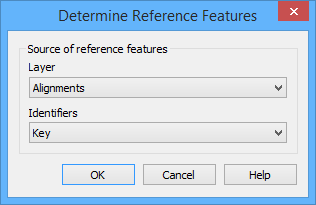
4. Choose the reference Layer from the list.
The closest reference feature from the selected layer will be found for each of the shoal boxes. To identify which reference feature has been assigned to the shoal, an identifier is displayed in the "Point of reference" attribute (shlref). You must select the attribute value of the reference features to use as the Identifier.
5. Select an Identifier from the list.
6. Click OK.
A point of reference is determined for each of the specified shoal boxes. When finished, a message is displayed in the Output window.
