Menu | Tools > Engineering Analysis > Shoals > Reorient Boxes |
Tool |
|
The Reorient Boxes command is used to change the orientation of the currently selected shoal box(es). During this process, the shoal boxes in all affected groups are recreated to match the selected alignment or orientation.
To reorient shoal boxes:
1. Select the Shoal Boxes layer in the Layers window.
When reorienting a shoal box, all boxes within the shoal group will automatically be reoriented, so it is not necessary to select all of the boxes within a group. If you wish to reorient boxes in multiple groups, you must select at least one box from each group. To determine which boxes are included in a group, select the shoal boxes in question and view the Collection Feature ID value for each shoal box in the Selection window. For more information on shoal groups, see Group Areas.
2. Select one or more shoal boxes in the Display window.
3. Select the Reorient Boxes command.
Menu | Tools > Engineering Analysis > Shoals > Reorient Boxes |
Tool |
|
The Reorient Boxes dialog box is displayed.

Shoal boxes can be aligned with an alignment in the reference model or with a specific angle. When using an alignment, the shoal boxes will be parallel to the direction of the selected alignment. When using an angle, the shoal boxes will be aligned using azimuth values (North = 0 degrees, East = 90 degrees).
4. To reorient using an alignment, select Use alignment and choose an alignment from the list.
To reorient using an azimuth value, select Use azimuth and enter a value in the degrees field.
The default value displayed in the degrees field is the current azimuth value of the selected shoal box. If multiple shoal boxes are selected, it is the azimuth value of the first shoal group selected.
If the rotation will result in small shoal boxes, you can opt to have the boxes merged during the reorientation.
5. [Optional] Select the Automatic shoal merging check box to enable the option.
6. If merging is enabled, enter a minimum width for the shoal boxes.
The Minimum depth precision field allows you to define the number of decimal places to include in the Minimum depth value of shoal boxes. The default value is 2.
7. [Optional] Change the Minimum depth precision value.
8. To finish, click OK.
The selected shoal boxes are reoriented. In the example below, the three shoal boxes have been reoriented at an angle of 80 degrees.
Any merges that were performed previously on the selected boxes will be undone because the reorientation will create new shoal boxes for the affected groups |
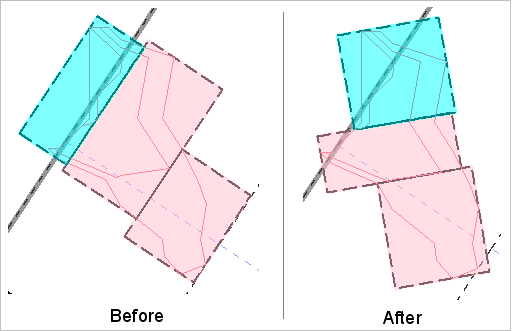
Because each shoal box encompasses a different area of the shoals after being reoriented, the number of boxes may increase or decrease as necessary to ensure all shoal areas are covered. No change was required in the example above.
If necessary, the reorientation can be reversed using the Undo command. For more information, see the Undo topic in the CARIS BASE Editor Reference Guide.
