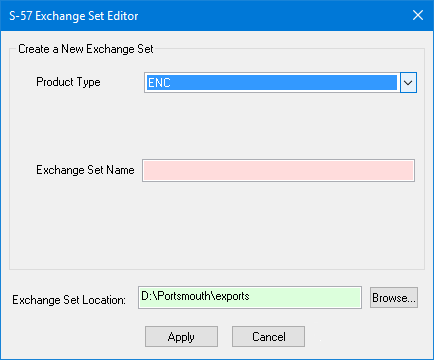
The S-57 Exchange Set Editor can be used to create a new exchange set. The table of contents file called CATALOG.031 is created automatically.
An exchange set folder, including an ENC_ROOT folder for the ENC, is created in the selected location. Other files can be included using the Add File command.
The dialog box changes to suit the selected product type.
Interface: ENC, AML 3.0, IENC, IENC Overlay
S-57 Exchange Set Editor:
Option | Description |
Create a New Exchange Set | Define the following: • Product Type: Select from the list. • Exchange Set Name: This can be any alphanumeric combination. Type the name in the box. |
Exchange Set Location | Click Browse and select a location for the exchange set. |
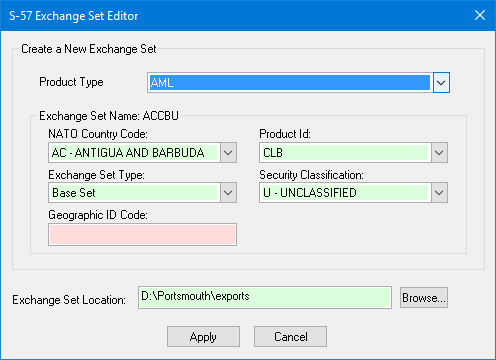
Interface: AML
S-57 Exchange Set Editor
Option | Description |
Create a New Exchange Set | Define the following: • Product Type: Select from the list. • Exchange Set Name: The name for an AML exchange set is generated from the options in this group: • NATO Country Code: A code used to identify the producing country. This forms the first two characters of the exchange set name. • Product ID: The AML product type. This forms the third character of the exchange set name. • Exchange Set Type: The type of exchange set. This forms the fourth character of the exchange set name. • Security Classification: Select from the list This forms the fifth character of the exchange set name. • Geographic ID Code: A user-defined value. Type in the box. This forms the last three characters of the exchange set name. |
Exchange Set Location | Click Browse and select a location for the exchange set. |
Procedure
1. Define all the options.
2. Click Apply.
You are returned to the S-57 Exchange Set Editor. Your new empty exchange set is displayed in the file name box at the top.