Modify a Vertical Surface
It is possible to adjust the location of the vertical surface x,y,z points either by dragging or by editing any of the points in the coordinate grid. One of the four points defining the vertical surface may be removed, however, vertical surfaces must always have two x,y locations and either three or four unique x,y,z points.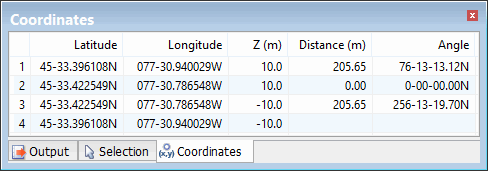
Edit a Point
To edit a point within a vertical surface:
1. Select the surface you want to modify in the Model window, or superselect the surface in the Display window.
The selected surface is now the active reference model feature.
2. Do one of the following:
• Drag the existing point to a new location in the Display window.
• Edit the point within the Coordinates window.
Remove a Point
To remove a point from a vertical surface:
1. Select the surface you want to modify in the Model window, or superselect the surface in the Display window.
The selected surface is now the active reference model feature.
2. Select a point in the coordinate grid, right click and select Delete point to remove that point from the surface.
The vertical surface point is removed.