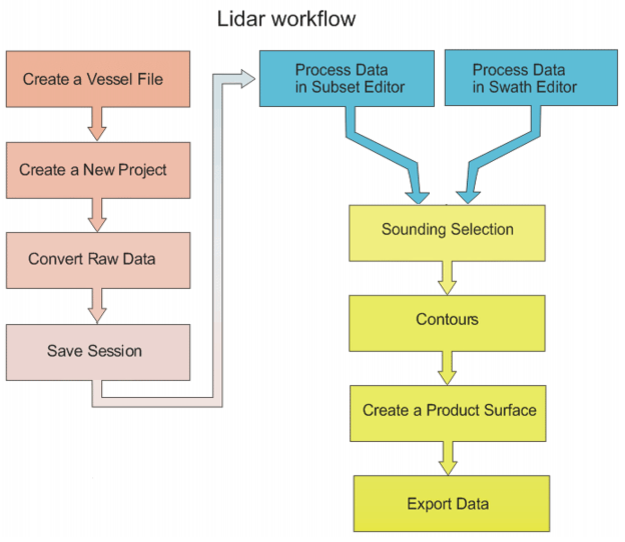
LIDAR projects follow a similar workflow to other processing in HIPS. The following chart shows the most important steps for cleaning LIDAR data.
1. Create a new HIPS Vessel File (HVF) vessel containing sensor locations and uncertainties related to the LIDAR and navigation information. See Create a New HVF.
2. Create a new project with Project-Vessel-Day directory structure to store the data. See New Project.
3. Convert the raw data files to HIPS format and assign to the new project directory. See Conversion Wizard.
4. Save the currently open data as a session file.
Process data in Subset Editor or Swath Editor.
5. Process data using Subset Editor:
• Create a Subset Tile layer.
• Open the Subset Editor and use the subset bounding box to select an area in the Subset Tile layer.
• View and clean data.
• Change the quality flag of soundings, if needed.
• Create designated soundings using the Designate Sounding and Find and Designate commands.
• Track the progress of cleaning by flagging tiles as Complete, Partially Complete or Reset.
6. Process in Swath Editor:
• Open the Swath Editor to examine and clean sounding data.
• Select soundings to view waveform data and other information.
• Change the quality flag of soundings, if needed.
• Reject data or change the status of a rejected sounding back to
• accepted.
• Create designated soundings using the Designated Sounding and
• Find Designated Sounding commands.
7. Create a surface. See New Surface (Regular Gridded) of the User Guide.
8. Add contours and other layers.
9. Designate shoalest soundings.
10. Create a product surface.
11. Export data.