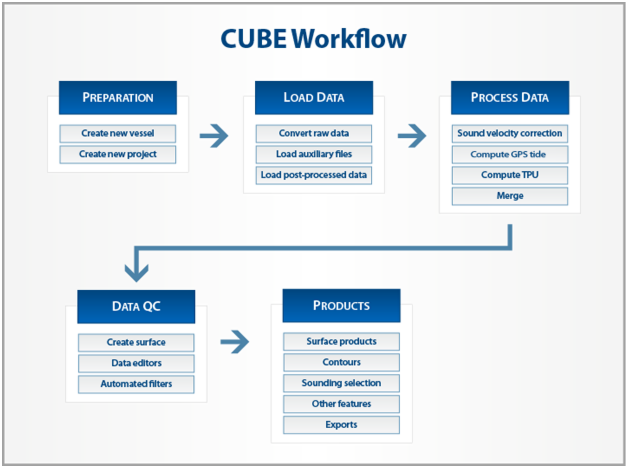
• Create a Vessel File: Create or edit vessel information on sensor locations and uncertainties. See Create a New HVF
• Create a new project: Set up the Project - Vessel - Day data structure. See New Project
• Convert raw data: Convert data into HIPS data format using automated process. See Import > Conversion Wizard
• Load auxiliary files and post-processed data.
• SVC: Load and edit sound velocity profiles and apply the correction. [Optional] See Sound Velocity Correction
• Compute GPS tide. See Compute GPS Tide
• Compute Total Propagated Uncertainty (TPU): Use uncertainty values entered in the HVF to compute the total propagated error of each individual sounding. See Compute Total Propagated Uncertainty
• Merge: Combine vertical and horizontal information to produce geo-referenced data. If changes are later made to the navigation and/or motion data during the QC process, the Merge process is re-applied.
• Create a surface: Use merged data to produce various types of surface. See New Surface (Regular Gridded)
• Data editing: Examine and edit sensor data, such as navigation, gyro, heave, if problems have been identified in the surface.
• Filtering: Use automated or manual tools to filter soundings using swath geometry and/or according to IHO survey order accuracies. Filter water column data for editing in Subset Editor.
• Process Data in Subsets: Using hypothesis editing, validate the CUBE surface and edit geo-referenced soundings. Add bathymetry from edited water column data.
• Finalize surface: Update the validated surface after data has been edited, and ensure designated soundings are carried through to bathymetric products.
• Create Product surfaces: Produce a generalized product surface from a surface, and add:
• Contours: Use automated functions with a surface to output contours.
• Sounding Selection: Use a height source for selection of a representative sounding set.
• [Optional] Process Imagery Data: backscatter or side scan data can be processed in mosaics.
• Export Data: Selected soundings, surfaces and mosaics can be exported to various formats. Export HIPS and SIPS Data