Menu | Tools > Editors > Single Beam > Add to Barcheck |
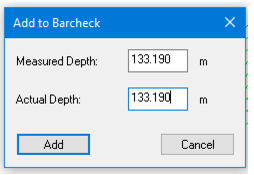
Pop-up | Add to Barcheck |
If there is barcheck data available in single beam data, it can be used to generate a Sound Velocity Profile (SVP) file based on a list of measured depths against a list of actual depths. The Barcheck tab in the Single Beam Editor control panel displays barcheck values and is used to add more barcheck values.
The Measured Depth field displays the depth that was recorded by the sounder. If more than one sounding is selected, then a mean is calculated from the selected soundings.
Interface
The Add to Barcheck dialog box contains two options.
Procedure
1. Select soundings in the Single Beam Editor window.
2. Select Add to Barcheck command.
The Measured Depth field displays the depth that was recorded by the sounder. If more than one sounding is selected, then a mean is calculated from the selected soundings.
3. Enter a new depth value from the barcheck data in the Actual Depth field.
4. Click Add.
The depth values and the sound velocity for the coordinates are now displayed in the Barcheck tab.
5. Repeat these steps as needed.
6. To delete a set of values from the table, highlight it and click Remove.
7. Click Save.
8. In the Save dialog box, type a name for the file and click Save.